Choosing a POS system in 2026: 9 things to look for
You choose a new POS system for years to come. Yet many retailers decide on price, or on whatever the shop next door uses. These nine points help you find a point-of-sale system that fits your shop.
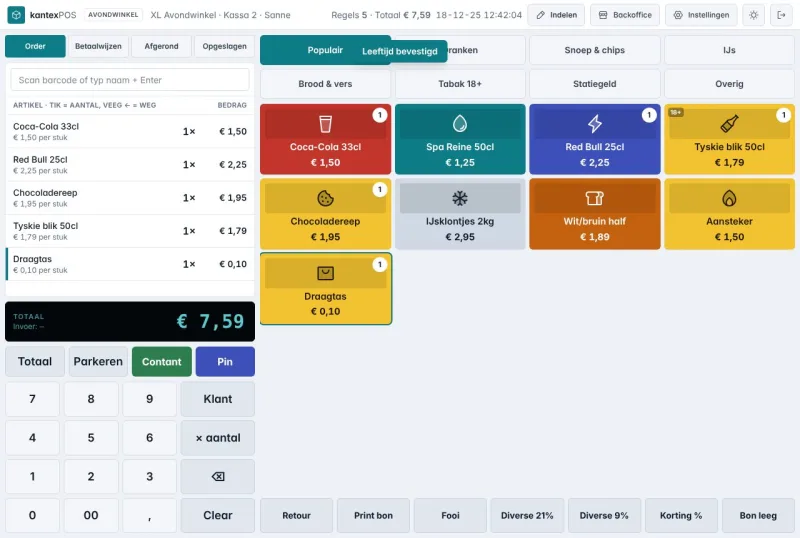
1.Speed at the till
Ask a member of staff to ring up ten products in a demo. Check that the number pad is always in the same place, and that a mistake can be corrected without a manager.
2.Total cost per month
Add up the subscription, modules, extra tills and transaction fees. Ask whether you can cancel monthly.
3.Hardware and payments
Ask which card terminals are supported and whether your existing receipt printer and cash drawer will work. Ideally, choose one payment provider for both your POS and your webshop, so reconciliation adds up automatically.
4.Working without internet
An outage should never stop your sales. The POS must keep working and synchronise later.
5.Reports you actually use
Sales per day, week and month, by category and by employee. And can you send them to your accountant easily?
6.Stock and ordering
A POS that tracks stock can also build an order list. That saves you time every week.
7.Growing to more shops
Can you add a second shop or a restaurant to the same account later on?
8.Switching and support
Who moves your products across, and how quickly do you get an answer when something goes wrong on a Saturday evening?
9.Your data
Where is your data stored, and can you always export it if you leave?
In summary
- Speed at the till
- Total cost per month
- Hardware and payments
- Working without internet
- Reports you actually use
- Stock and ordering
- Growing to more shops
- Switching and support
- Your data