POS system for shops, supermarkets and hospitality

One POS for all your shops. From convenience store to restaurant.

Kantex Retail brings your POS, self-checkout, stock and webshop together in one system. On a touchscreen, tablet or phone, in light or dark mode. With a back office built into the POS and an AI agent that keeps an eye on things.

  • Free migration from your old POS
  • No credit card required
  • Cancel monthly
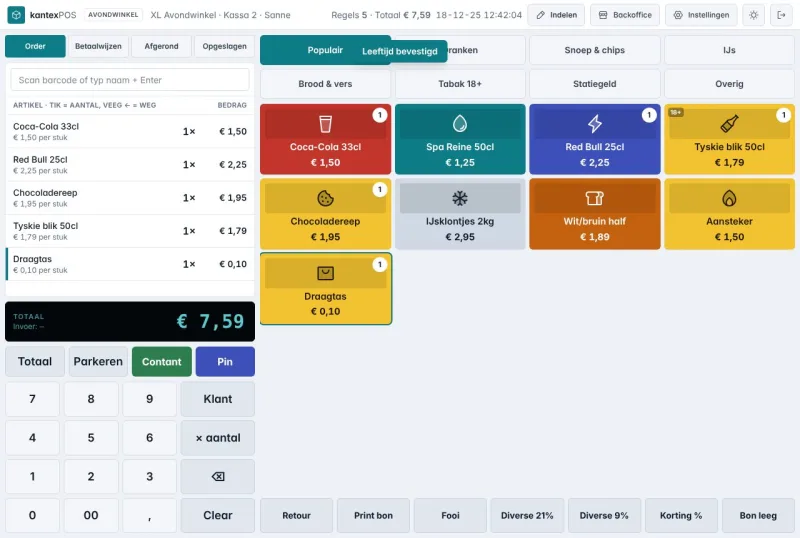
Kantex Retail POS screen in a convenience store
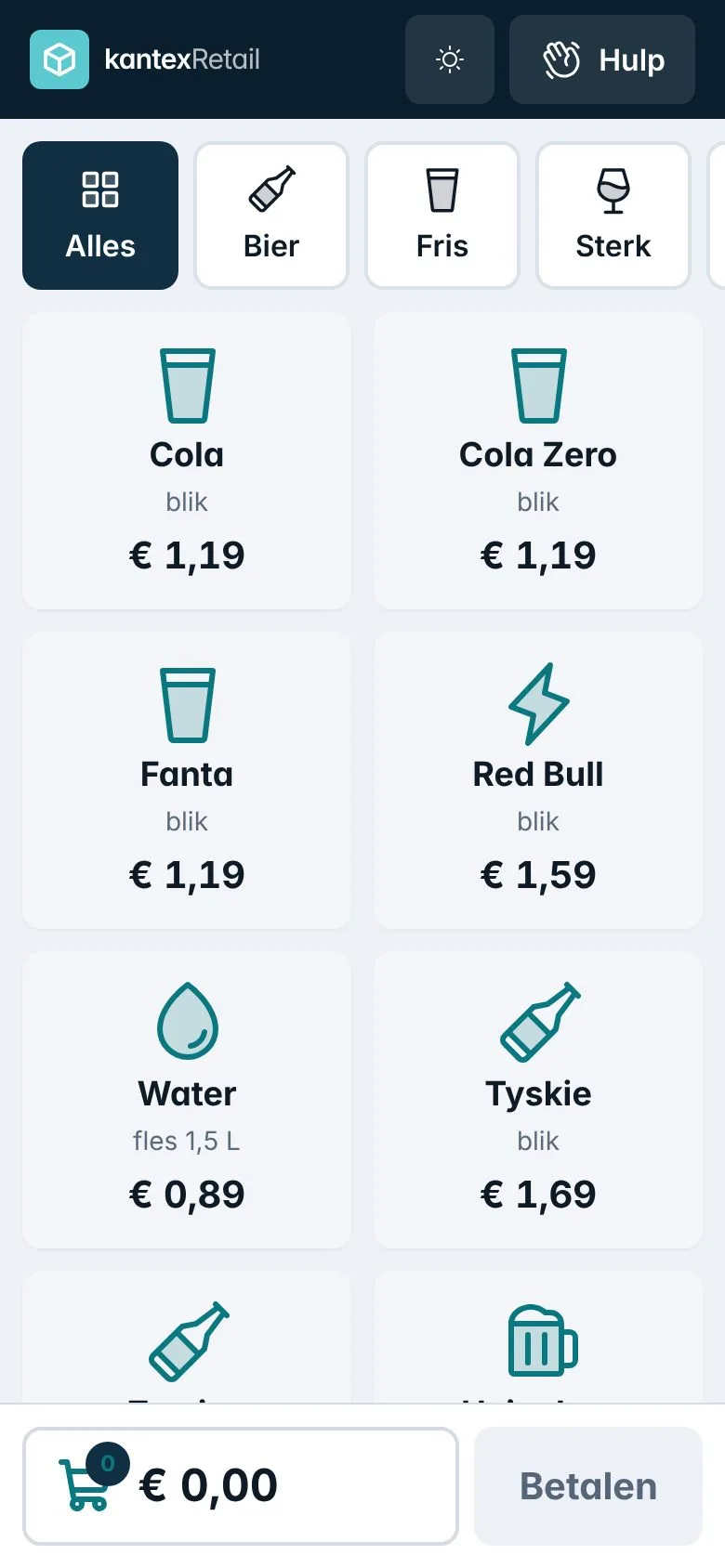
Kantex POS on a phone
Self-checkout Z3 · needs help Today €4,065.95 · +8%
  • 14-day free trialEvery feature, no credit card
  • Free migrationWe migrate your old POS system
  • Cancel monthlyNo annual contract required
  • Your data is yoursFully exportable at any time
For every type of business

Every shop gets a POS that fits

Fast checkout with large tiles

  • Tap a line to change the quantity, swipe to remove it
  • Age check (18+) in one tap, bottle deposit on its own button
  • The customer display shows your promotions when nobody is paying
Try it yourself
Fast checkout with large tiles
Everything in one package

What you get

  • A touchscreen POS anyone can use

    Large tiles, tap for quantity, swipe to remove. Light, dark or automatic.

  • Self-checkout with risk analysis

    Categories with images, quick search and a risk score, so you only check where it matters.

  • Tables and ordering by phone

    Draw your own floor plan. The service app sends tickets to kitchen and bar.

  • Stock and purchasing

    Stock per shop, a minimum per item and an order list you send in one tap.

  • Customer display

    A second screen showing the basket, the total and your promotions between customers.

  • Back office in the POS

    Manage products, prices, staff and cash behind an admin PIN.

  • Revenue per day, week and month

    Compare periods and send the report to your accountant in one click.

  • AI agent and MCP

    Ask Claude or ChatGPT about your revenue or stock. Changes only go through once you confirm them.

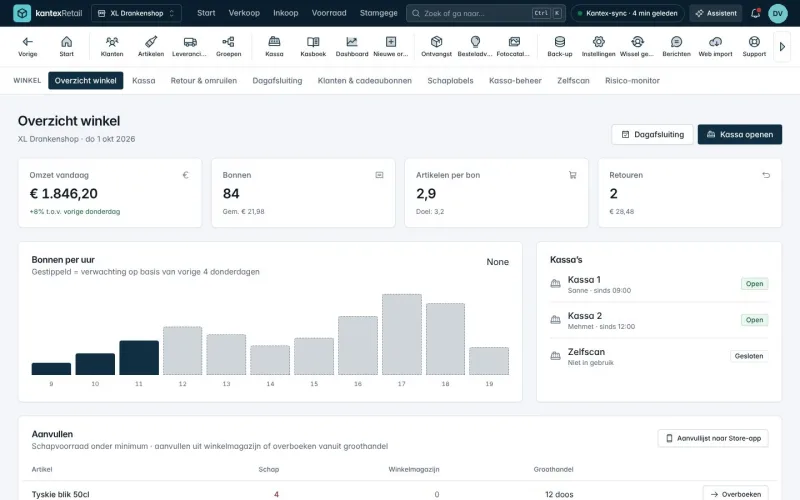
Shop overview with hourly revenue and POS terminals
Multiple branches and locations

One account, all your shops

  • Each shop has its own POS terminals, tiles, prices and staff
  • Central management: see all locations side by side
  • Permissions per employee and per shop
  • Wholesale too? Add the Wholesale branch to the same account
Wholesale too? See Kantex WholesaleThe same items, stock and customers. One invoice.
AI agent and MCP

Just ask your AI assistant

Connect Claude, ChatGPT or your own agent through the Model Context Protocol. You choose which shops, data and actions are allowed. You always confirm changes yourself in Kantex.

How the MCP connection works

Vraag: How much did my shops take yesterday, and which one was busiest? Antwoord: Yesterday your 3 shops took €11,940 between them. Supermarket Delft was the busiest with €6,214 (412 receipts), followed by the convenience store with €3,480. Shall I send the report to your accountant?

via mcp.kantex.nl · omzet_opvragen
Payments via Adyen

All payments in one integration

Kantex uses Adyen for all card terminals and online payments. The POS, terrace, self-checkout and webshop share one integration, so you get one overview and one reconciliation.

Kantex payment partner
  • Card terminal at the POS

    Adyen SFO1 with touchscreen. The amount goes from the POS to the terminal automatically.

  • Mobile payments

    Adyen AMS1 or Tap to Pay on an Android phone, for terraces, markets and self-checkout.

  • Online and in your webshop

    Cards, iDEAL and wallets through the same Adyen integration as your POS.

  • One overview

    All payments and payouts per day, automatically reconciled with your cash book.

Why switch

Fewer systems, less retyping

What you now handle with separate programs, Excel and phone calls comes together in one system in Kantex Retail.

Standalone POS + Excel compared with Kantex Retail
What you needStandalone POS + ExcelKantex Retail
POS, self-checkout and hospitality in one system Three suppliers Included
Revenue per day, week and month Adding up Z reports Included
Back office in the POS Separate program in the office Included
Multiple shops in one account One account per shop Included
Order list straight to your wholesaler A note or WhatsApp Included
AI assistant and MCP Not available Included
Pricing

Fair monthly pricing, cancel monthly

  • Start

    One shop, one POS

    €29 / month excl. VAT

    Billed monthly, cancel whenever you like

    • Touchscreen POS
    • Stock
    • Shelf labels
    • 1 POS · 1 shop · 3 users
    Try Start free for 14 days
  • Chain

    Multiple branches

    €149 / month excl. VAT

    Billed monthly, cancel whenever you like

    • Touchscreen POS
    • Stock
    • Shelf labels
    • Customers & loyalty
    • Accounting export
    • Webshop & CMS integrations
    • Self-checkout
    • Multiple organisations
    • 10 POS terminals · 3 shops · 50 users
    Try Chain free for 14 days
Build your own package with modules
  1. Sign up in 2 minutes

    Company details, sector and plan. Your own environment is ready straight away.

  2. Add products and customers

    Upload a file or let us transfer your old system. Free during the trial.

  3. Get going

    POS, app and back office work right away. After 14 days you choose a plan, or you stop.

Prefer to see it first? Book a 30-minute demo

A specialist shows you Kantex Retail based on your situation: your type of shop, your POS terminals and your figures. Online, at a time that suits you.

  • No sales pitch, just answers to your questions
  • A tailored price proposal on the spot
  • Your trial environment ready immediately
Choose a time

Switching? We do the work

We transfer your products, tiles, customers and gift cards free of charge during the trial. You test with your own data.

  1. Day 1Account and intake
  2. Days 2–3Data transferred
  3. Week 1Live with your team
See how it works

Frequently asked questions

Which card terminal do I use?

Kantex uses Adyen for all payments: a fixed Adyen terminal at the POS, a mobile terminal or Tap to Pay on an Android phone. Webshop payments and payment links also run through Adyen, with one overview of all payouts.

Can I transfer my products from my old POS?

Yes, and migration is free. Upload a CSV or Excel file, or let our team convert the export from your current POS system. We set up your tiles and categories for you straight away.

Does the POS still work if the internet goes down?

The POS keeps processing sales and syncs everything as soon as the connection is back. Card payments run through your card terminal.

What happens after the 14 days?

You choose a subscription or you stop. Nothing is charged without your approval, and your data is kept for 30 days.

Can I run shops and a wholesale business in one account?

Yes. Kantex has two branches, Retail and Wholesale. You switch them on in the same account and see everything together.

What is an MCP connection?

The Model Context Protocol lets you connect Claude, ChatGPT or your own AI agent to Kantex. You decide which data and actions are allowed.
Try Kantex Retail free for 14 days

Full features, your own environment and help with the switch. No credit card needed.

  • No credit card
  • Cancel monthly
  • Support from the Netherlands